


Delivery Evaluator: delivery company surveys
Follow up orders and deliveries with customer surveys, then review ratings and comments about the shopping experience.
This page is available in English while its translation is updated.
Delivery Evaluator – a small and easy system for automatic quality measurements of your deliveries.
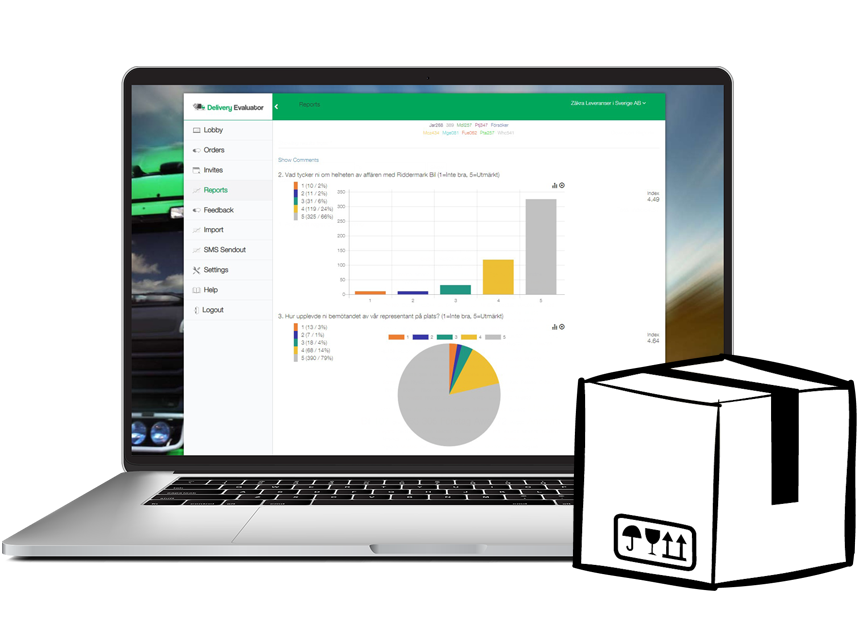
Delivery Evaluator allows you to receive customer satisfaction information and feedback comments automatically or with a few button clicks. When you are always informed about your customers’ likes and dislikes, it is easier for your organization to grow and work professionally.
Schedule surveys after an order
Connect a supported order source or upload a recipient list. Choose the order status and follow-up timing that match the experience you want the customer to evaluate.

Read ratings alongside customer comments
Review charts and individual responses in the dashboard. Compare ordering, product and delivery questions separately so a low overall rating does not hide the reason for it.

Choose email or SMS invitations
Select the channel that fits your audience. Review SMS charges and any sending limits during setup; the module subscription does not describe every possible communication charge.

Choose a connected or imported workflow
An integration can schedule follow-up from an order event. For a separate workflow, upload the relevant recipients and choose the survey and invitation time.

Automate invitations and reminders
Once the order connection and sending rules are configured, the workflow can schedule invitations and reminders. Test the rules with a completed order and review failed or incomplete sends.

Check your ecommerce connection
The directory describes Shopify, PrestaShop and WooCommerce survey integrations. Confirm the supported store version, authorization method and order status rule before enabling automatic follow-up.

Understand the dashboard satisfaction score
Delivery Evaluator describes its dashboard satisfaction score on a 1–5 scale. Keep that scale separate from a percentage-based CSAT calculation, and review the number of responses with each comparison.

Use personal invitation links
The documented workflow deactivates the parallel email or SMS link after a customer answers. Verify the invitation behavior with a test response, especially when using both channels.
Plan access and data storage
Decide which people need dashboard access and which order fields the survey requires. Confirm hosting, retention and backup arrangements for your account with Examinare.

Review the data processing terms
Check the data processing information before importing customer information. Use the survey for the purpose described in the invitation and collect only the relevant order and contact fields.
Prepare the languages your customers use
Create and review translated questions and invitations before sending them. Match the language version to the customer information available in your order workflow.

Connect your Examinare account
Choose an existing Examinare account or an account product in the price calculator. The account, monthly module and one-time setup are shown separately.

Filter responses and share reports
Review individual responses and filter by the fields available for your setup. Select the reporting period and confirm any scheduled email reports during configuration.
Separate delivery issues from store issues
Ask separately about ordering, dispatch, delivery timing and package condition. Send the feedback to the team responsible for the experience described by the customer.
Follow up payment-related feedback
If feedback is connected to a payment provider, confirm which transaction and customer fields are available. A payment confirmation and a delivered order may require different survey timing.

Test the store-to-survey workflow
Place a test order that meets the chosen rule. Check the invitation timing, survey link, response and report before enabling invitations for customers.
Questions for a delivery feedback survey
An online survey tool for delivery companies should distinguish the delivery experience from the product and the ordering process. Ask whether the delivery arrived when expected, whether the package was damaged, and what the customer would improve.
See ecommerce survey workflows for a test-order checklist and customer satisfaction measurement for score definitions.
Delivery feedback survey questions
What should a delivery company survey ask?
Ask about the delivery timing, package condition and the delivery interaction separately. Add an open comment so customers can explain a low or high rating. Keep product satisfaction separate from delivery satisfaction.
Can Delivery Evaluator invite customers automatically?
The documented workflow connects to fulfilled orders and sends follow-up questionnaires. You can also upload recipients and send invitations. Confirm the connector and timing during setup.
Can delivery feedback be collected by both email and SMS?
The documented workflow uses personal email and SMS invitation links and deactivates the parallel link after a response. Confirm channel charges and test that behavior before launch.
What is included in the price calculator?
The calculator lists the Examinare account, a monthly module subscription for one administrative user and a one-time setup fee. Checkout shows the final total and applicable tax.


